
How do I write bold, italic, spoilers and code in messages?
You format text in Voxnup messages with symbols: **bold**, *italic*, ~~strikethrough~~, ||spoiler|| (revealed on click), `code` and a code block with three backticks. Enter sends the message, Shift+Enter starts a new line. Use @username to mention a person, @RoleName in channels to mention a role, and @everyone to mention everyone.
Formatting symbols
| You type | You see |
|---|---|
**bold** | bold |
*italic* | italic |
~~strikethrough~~ | |
||spoiler|| | Hidden text; revealed on click |
`code` | Inline code |
Lines starting and ending with ``` | Code block (no symbols inside are processed) |
:emoji_name: | Emoji (e.g. :smile:) |
https://… | Clickable link |
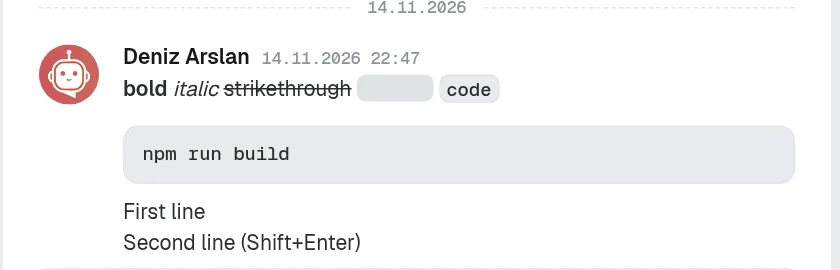
This is how the symbols above look in a sent message:
New lines
Enter sends the message right away. To move to a new line in the same message, use Shift+Enter. Separate the lines of a code block with Shift+Enter as well.
Mentions
- Typing
@opens a suggestion list: pick with ↑ ↓, insert with Enter or Tab, close with Esc. @usernamementions a person; they get a notification.- In channel rooms,
@RoleNamementions everyone with that role. The role needs "Mentionable by everyone" turned on, or you need the Use @everyone permission. @everyonenotifies everyone in the room. In channels your role needs the Use @everyone permission; without it the mention sends no notification.- Mention notifications are sent in channel rooms and groups; in a one-to-one direct message a mention doesn't send an extra notification.
Headings, quotes and bullet lists are not supported; those lines appear as plain text. Messages that contain only emoji are shown larger.
Frequently asked questions
Why didn't the asterisks inside my code block turn bold?
No symbols inside a code block or inline code are processed; they appear exactly as typed.
How do I reveal a spoiler?
Click the hidden text.
Why didn't a link preview appear?
Link previews (YouTube, channel invites and other sites) appear if the linked page allows it. In channels your role needs the Embed Links permission.