
How do I make voice and video calls on Voxnup?
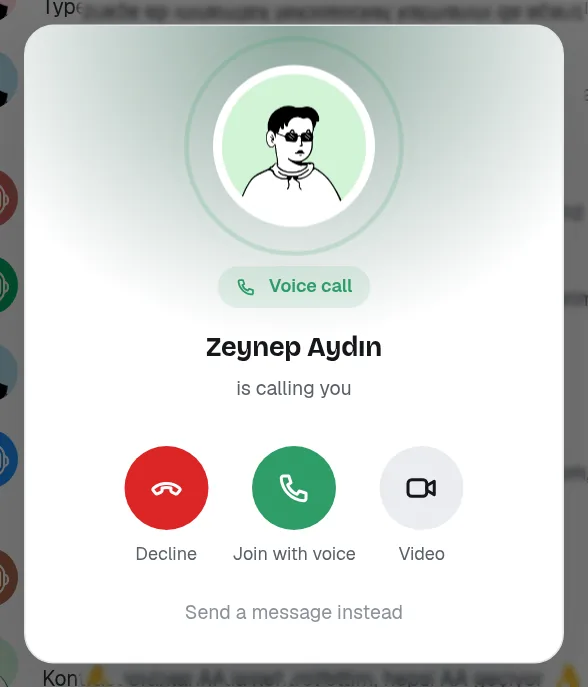
Open the direct message with a friend or group and press the phone (voice) or camera (video) button in the header. Or right-click the person and choose Voice Call. The other side sees an "is calling you" card: Decline, Join with voice, Video or Send a message instead. If it isn't answered within 30 seconds the call ends and a "Missed voice call" entry appears in the chat. A group call rings everyone in the group.
Starting a call
Open the direct message and press a call button
In the chat header: Start voice call (phone) or Start video call (camera). You can also right-click someone in your friends list and choose Voice Call.
Use the call panel
During the call, the panel above the chat has microphone, deafen, camera and screen share buttons, plus Minimize call and the end call button. These work the same way as in voice rooms.
Incoming calls
When someone calls you, a call card opens in the middle of the screen. Join with voice joins with audio only, Video joins with your camera on. Send a message instead declines the call and lets you write in the chat. Calls reach you even when your status is Invisible.
Call records in the chat
Every call leaves an entry in the chat: started, ongoing, ended with its duration, not answered or declined. You can join an ongoing group call later with the Join button on its entry.
Frequently asked questions
Why can't I call someone?
You can't call someone you've blocked or who has blocked you. A notification says why (e.g. "You can't call this user."). If there's a network problem, it says "The call could not be started. Please check your internet connection."
How long does a call ring?
30 seconds. If it isn't answered, the call ends and is recorded as missed.
My voice doesn't go through in a call, or I can't hear the other person
The same steps as in voice rooms apply: Voice troubleshooting guide.