
Can't connect to a voice room, or my voice connection keeps dropping
Voxnup uses two connections to join a voice room: the app's live connection and the voice server connection. If either can't be made, a message on screen tells you why (table below). If the connection drops briefly, Voxnup reconnects you to the same room automatically. If the problem continues, it's usually the network: turn off your VPN, try another network (e.g. your phone's hotspot), and on a school or work network make sure the firewall isn't blocking voxnup.com.
Fix by message
| What you see | What it means | What to do |
|---|---|---|
| "Can't reach the server's live connection. Messages and voice rooms may not work." (top banner) | The app's live connection dropped; Voxnup retries every few seconds. | Check your internet. When it's back, "Connection restored." appears. |
| "Joining a voice room needs a live connection to the server, and it can't be reached right now. Try again shortly." | You clicked a voice room while the live connection was down. | Wait until the top banner disappears, then click the room again. |
| "You don't have permission to connect to this room." | Your role doesn't have the Connect permission in this room. | Ask the channel admin for it. See Roles and permissions. |
| "You can't join a voice room while you're timed out." | A moderator gave you a timeout in this channel. | You can join once it expires. |
| "The voice room is full. You cannot join because the user limit has been reached." | The room's user limit is reached. | Try again when someone leaves, or join another room. |
| "Couldn't join the voice room. Please try again in a moment." | The voice server couldn't set up the room. | Click again after a few seconds. If it keeps happening, email support@voxnup.com. |
| "Could not connect to the voice call. Please try again." | The voice server couldn't be reached after several attempts. | Follow the network steps below. |
| "Voice connection lost, reconnecting…" | The voice connection dropped briefly; Voxnup is restoring it on its own. | Wait. When it works, "Voice connection restored." appears. |
| "Connection is back, you rejoined the voice room." | Your connection dropped and came back; Voxnup put you back in the same room. | Nothing to do. |
| "You left the voice room because the connection dropped, and rejoining automatically failed…" or "The voice connection couldn't be restored and you left the voice room…" | Automatic reconnection failed. | Check your internet and click the room to join again. |
| "Are you there?" followed by "You were removed from the voice room due to inactivity." | No sound came from you in the room for the channel's AFK timeout (10 minutes by default), and the warning wasn't answered within 60 seconds. If the channel has an AFK room, you're moved there instead of being removed. | When the warning appears, press I'm here. Talking, unmuting, or sharing your screen or camera counts as activity. Stage rooms don't have this rule. |
What does the voice panel say?
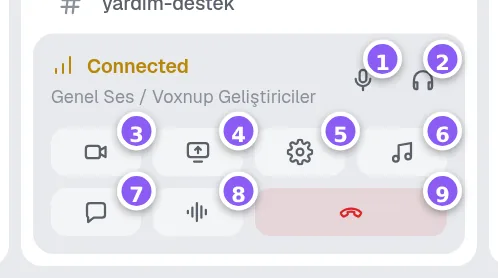
While you're in a voice room, the panel at the bottom left shows the room name and the connection status. "Connected" means everything is ready; "Waiting for Socket" means the connection is still being set up. If you see a yellow triangle next to your own name with "Couldn't start your voice stream.", your audio can't reach the voice server; follow the network steps below.
Network, firewall and VPN checks
Reload the page or restart the app
F5 in the browser; in the desktop app, close and reopen it. Then join the room again.
Turn off your VPN, proxy and ad blocker
Some VPNs and proxies block the connections voice chat uses. Turn them off and try again. In ad or privacy blockers that run as browser extensions, add an exception for voxnup.com. In the Opera browser, Voxnup reminds you separately: its built-in ad blocker needs a
[*.]voxnup.comexception, and the WebRTC setting under System must allow all available network interfaces.Try another network
School, work, dorm, hotel and café networks often block voice chat traffic. The fastest way to tell whether the network is the problem is to connect to your phone's hotspot and try there. If it works there, ask the network administrator to allow voxnup.com.
Check your firewall
For voice chat, Voxnup opens secure connections to voxnup.com: the voice server connection uses port 8989 (WSS), and the audio itself flows over UDP. If a firewall or antivirus program blocks these, allow your browser or Voxnup Desktop.
Use a wired connection or move closer to your router
If audio is choppy or drops often, weak Wi-Fi is usually the cause. Pausing big downloads on other devices also helps.
Frequently asked questions
It says "Connected" but nobody hears me and I hear nobody. Why?
The app connection is up, but audio may be blocked on the network. This happens most often on school, work and public networks, or behind VPNs. Try another network (e.g. your phone's hotspot); if it works there, the problem is the network you're on.
My connection dropped. Do I have to rejoin the room myself?
Usually not. When the connection comes back, Voxnup puts you back in the same room and says "Connection is back, you rejoined the voice room." If that doesn't happen, a notification appears; then click the room to join.
Why do I get removed from the voice room after a while?
If no sound comes from you for the channel's AFK timeout (10 minutes by default; the channel settings allow 1 minute to 1 hour), the "Are you there?" warning appears; if you don't press "I'm here" within 60 seconds, you're removed from the room. If the channel has an AFK room, you're moved there instead; nobody can speak in the AFK room, so switch to another voice room to talk. This cleans up accounts left connected in empty rooms.