
I can't sign in to Voxnup
If you see "Your username or password is incorrect.", check your details or reset your password. If a wrong password is entered for an account 10 times within 15 minutes, that account shows "Too many attempts. Please wait a moment and try again." for 15 minutes; just wait. If two-factor authentication is on, enter the 6-digit code from your authenticator app, or one of your recovery codes if your phone isn't with you.
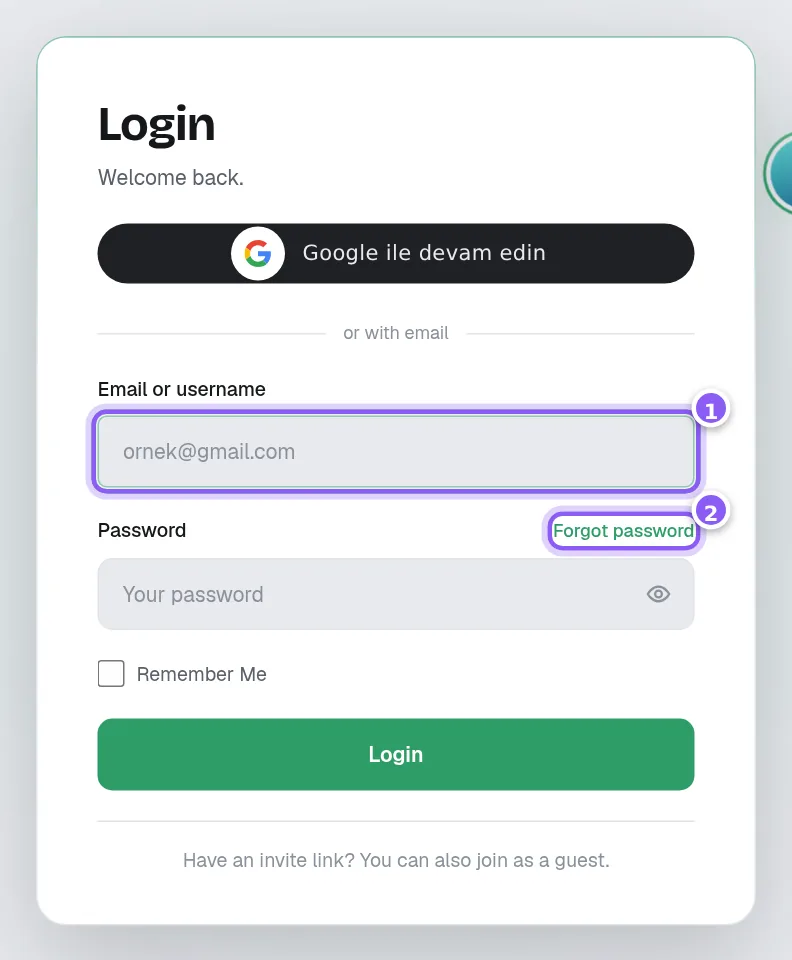
The sign-in screen
In the Email or username field you can type your email address, your username or the phone number linked to your account (1). If you don't remember your password, use the Forgot password link (2). With Remember Me ticked you stay signed in on this device.
Error messages and fixes
| Message you see | What to do |
|---|---|
| Your username or password is incorrect. | Try again, minding upper/lower case and your keyboard language. If it still fails, reset your password. |
| Too many attempts. Please wait a moment and try again. | The account received 10 wrong passwords in 15 minutes, or more than 20 sign-ins were tried from the same internet connection in 5 minutes. Wait 15 minutes; you can reset your password meanwhile. |
| Invalid code. Please try again. | Authenticator codes change every 30 seconds. Make sure your phone's clock is set automatically and enter the current code. |
| Verification timed out. Please sign in again. | The code step after the password is valid for 5 minutes. Sign in from the start. |
| Recaptcha verification failed. | Reload the page. If an ad blocker or VPN blocks Google reCAPTCHA, turn it off temporarily. |
I can't reach my phone: sign in with a recovery code
Sign in with your password
At the code step, click Can't reach your phone? Use a recovery code at the bottom.
Enter one of your recovery codes
Type one of the 10 codes you saved when you turned on two-factor authentication and press Verify. Each code works once; the screen shows how many you have left.
Create new codes
Once you have your phone again, turn two-factor authentication off and on again in Settings > Account Settings > Privacy; you get a new QR code and 10 new recovery codes. See Two-factor authentication.
If you don't have your recovery codes either, you can't sign in to your account; email support@voxnup.com with your username.
Frequently asked questions
I signed up with Google/Apple and can't sign in to the desktop app
The Windows app has no social sign-in buttons. Set a password for your account with Forgot password, then sign in with your email and password.
I signed up but can't sign in
Your account is created when you click the link in the sign-up email. The link is valid for 1 hour; if it expired, sign up again. See Create an account.
I get signed out right after signing in
If your password was changed or Log Out From All Devices was used in Devices, old sessions are closed. Sign in again. If you didn't do this, change your password right away.
It says my account is suspended
Accounts suspended for breaking the rules show an explanation on screen. To appeal, email support@voxnup.com.